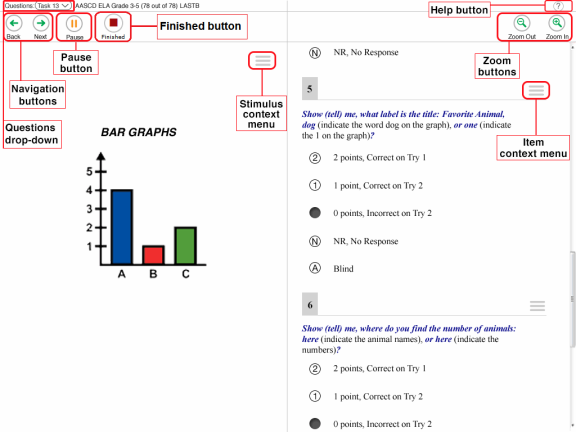
The following test tools are available:
 .
. | Global Tools | Description |
|---|---|
| Help (?) button |
To view the on-screen Test Instructions and Help window, select the ? button in the upper-right corner. |
| Navigation buttons | To move between test pages, use the Back and Next buttons in the upper-left corner. |
| Questions drop-down list | To quickly navigate to a specific test page, select a |
| Pause button | To pause a test, select Pause in the global menu. Pausing the test will temporarily log you out. |
|
|
This button appears after you enter data for all questions. Click this button to begin the test submission process. |
| Zoom buttons |
To enlarge the text and images on a test page, select Zoom In in the global menu. You can zoom in up to four levels. To undo zooming, select Zoom Out in the global menu. |
| Context Menu Tools | Description |
|---|---|
| Item Reset | To clear the entered response for a question, select Item Response Reset from the context menu. |
| Mark for Review | To mark a question for review, select Mark for Review from the context menu. |
| Notepad | To take notes, select the Notepad option from the context menu. |
| Strikethrough | For
|